When a parent decides their child needs help in math or a better-fit school, they don't flip through a phone book. They search, compare a few options, read reviews, and pick the one that feels clear and trustworthy.
Key takeaways
- Most families compare only a handful of options, so you need to make the short list.
- Reviews, clear information, and pricing are the biggest factors in their decision.
- Program pages should speak to a parent's worry and a student's goal.
- A free assessment is the easiest first step you can offer.
Parents decide from a short list
Local search research shows most consumers look at three or fewer businesses before choosing, and BrightLocal found 97% read online reviews for local businesses. The top decision factors? Clear information, reviews, and pricing, in roughly equal measure.
For tutoring centers and private schools, that means a parent's first impression of your website does most of the selling. If it answers their questions quickly and feels credible, you make the short list. If it's vague, slow, or outdated, you're skipped without ever knowing it.
What parents need in the first few seconds
- Who you help: grade levels, subjects, and learning needs.
- Where you are, and whether sessions are in person, online, or both.
- What makes you different: small groups, certified teachers, proven results.
- How to start: a clear "Book a free assessment" or "Schedule a tour" button.
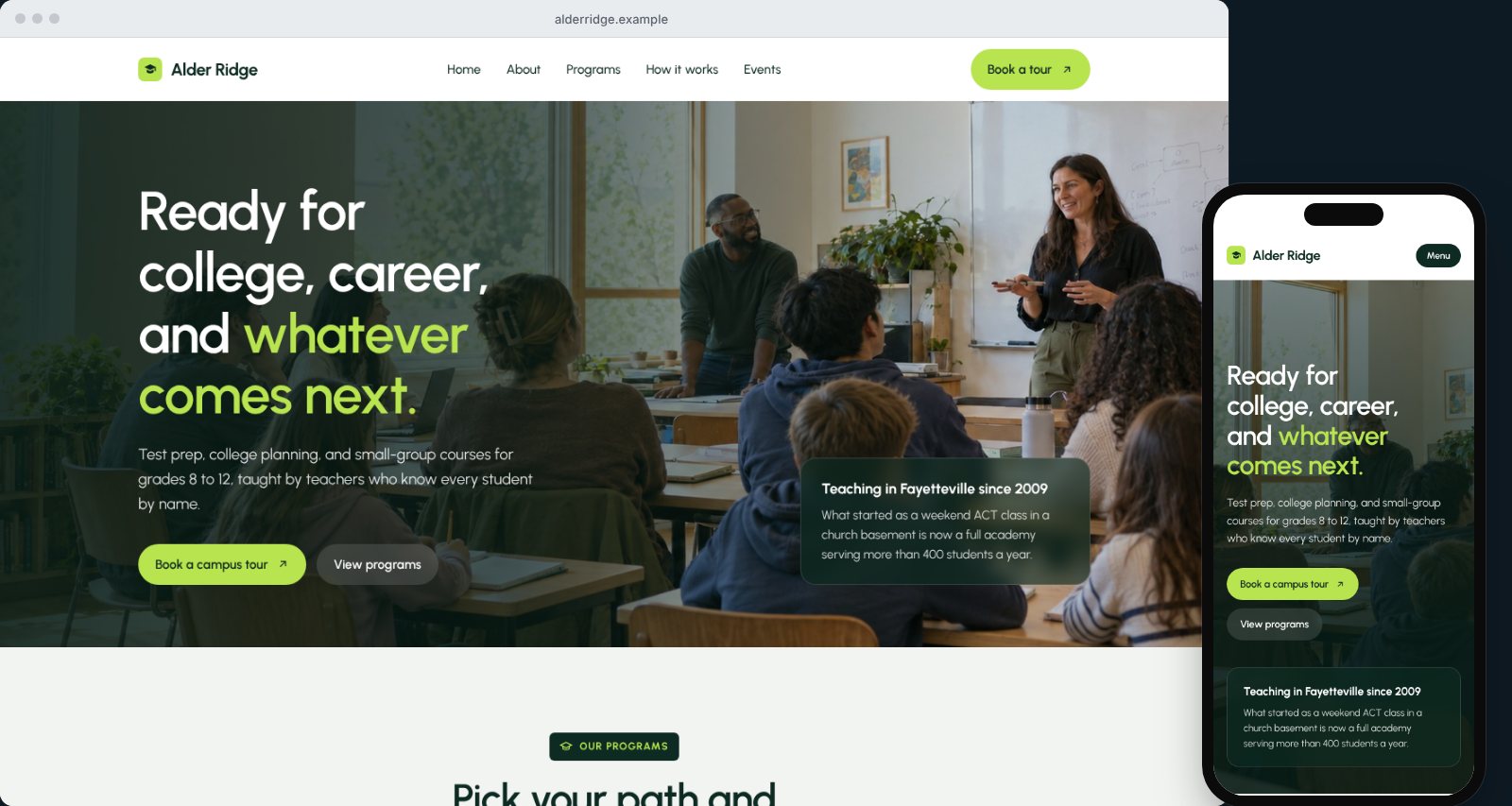
Our sample school homepage puts a warm classroom photo, a short promise, and a tour button front and center, with programs one scroll away.
Program pages that speak to parents
Parents search for specific needs: "math tutor for middle school," "ACT prep near me," "reading help for 2nd grade." Each program should have its own page that covers:
- The problem it solves, in a parent's words ("falling behind," "test anxiety," "needs a challenge").
- Who it's for, by grade and skill level.
- How sessions work: length, frequency, group size, and format.
- Who teaches, with qualifications.
- Pricing or starting packages.
- How progress is measured and shared with parents.
See our sample math tutoring page, which walks through levels from foundations to advanced, the session format, and what parents receive after each month.
Show your pricing
Many education businesses hide pricing, worried it will scare families away. In practice, pricing is one of the top three things parents weigh, and hiding it mostly creates phone calls with families who aren't a fit. Show starting prices or package ranges, and explain what's included. Families ready to invest will appreciate the honesty.
Build trust with parents
- Real photos of your center, classrooms, and staff.
- Tutor and teacher bios with degrees, certifications, and experience.
- Parent reviews that mention specific results, with permission.
- Results you can stand behind, like grade improvements or test score gains, stated honestly.
- Safety and policies: background checks, pickup procedures, and cancellation policies.
Reviews deserve special attention. Studies show most consumers will only choose a business rated four stars or higher, and nearly nine in ten expect owners to respond to reviews. Ask happy parents at natural moments, like after a report card improves, and reply to every review.
Make enrolling simple
The enrollment or assessment form should be short and mobile-friendly: parent name, contact details, student grade, subjects of interest, and preferred times. Explain what happens next, whether that's a call within one business day or an assessment scheduled within the week. Our sample enrollment page shows a simple three-step path.
Keep forms light on student details. Collect sensitive information like learning evaluations or medical needs later, through a secure process.
Local SEO for education businesses
- Complete your Google Business Profile with photos, hours, and programs.
- Mention the schools, districts, and neighborhoods you serve.
- Create pages around seasonal searches, such as summer programs, ACT prep, and back-to-school help.
- Keep your details consistent across Google, Facebook, and local directories.
Common education website mistakes
- Writing for students instead of parents. Parents usually make the decision and pay. Speak to their concerns first.
- Vague program descriptions. "Personalized learning for every student" doesn't tell a parent what actually happens in a session.
- Old event and schedule information. Last year's summer camp dates make the whole site feel abandoned.
- No mention of online options. Many families want flexibility. Say clearly whether you offer virtual sessions.
- Slow follow-up on inquiries. Parents often reach out to two or three centers at once. The first to respond warmly usually wins.
Plan your website around the school year
Education has a rhythm, and your website should follow it. In late summer, families search for back-to-school help and new programs. In fall, report cards spark searches for tutoring. Winter brings test prep for spring exams. Spring is when parents plan summer programs and school applications for next year.
Update your homepage banner and featured programs with each season, and publish a helpful article ahead of each peak, such as "Signs your child might need a math tutor" in October or "How to prepare for the ACT in eight weeks" in winter. These pages answer the exact questions parents search for at the exact moment they're ready to act, and they point directly to the program that helps.
Track inquiries and enrollments
Know which parts of your website bring in families. Track assessment requests and calls from the site, and ask every new family how they found you. Over a school year, you'll see which programs and seasons drive enrollment, and where to put your energy next.
If a program page brings in lots of visits but few inquiries, try clearer pricing, more parent reviews, or a stronger call to action. If inquiries come in but don't enroll, look at your follow-up speed and process. Your website and your front desk work as a team.
How FreshSite builds education websites
FreshSite builds custom websites for tutoring centers, private schools, and enrichment programs with program pages, staff bios, enrollment forms, and search basics included, then hosts, secures, and maintains them for one monthly price. Plans start at $59 a month with a $299 setup fee.
See more on our education websites page, or tell us about your school or center.
Frequently asked questions
What should a tutoring center website include?
Programs by subject and grade level, how sessions work (in person, online, group, or one-on-one), tutor qualifications, schedules and locations, pricing or package ranges, parent reviews, and a simple way to book an assessment or free consultation.
Should tutoring centers post prices online?
Yes, at least ranges or starting prices. Pricing is one of the top factors parents weigh, and showing it up front attracts families who are ready to enroll and saves your staff from answering the same question repeatedly.
How do tutoring centers get more students from Google?
Complete your Google Business Profile, earn reviews from parents, create a page for each subject and test-prep program, mention the schools and towns you serve, and make booking an assessment fast on a phone.
What's the best call to action for a tutoring website?
A free assessment or consultation works best for most centers. It's low-commitment for parents, gives you a chance to show expertise, and leads naturally to a program recommendation.