Patients now shop for care the way they shop for everything else: they search, compare, read reviews, and expect booking to be easy. Your website is your front desk before anyone ever walks in.
Key takeaways
- Most patients research providers online, often starting with "near me" searches.
- Online scheduling has become a deciding factor for many patients, especially younger adults.
- Provider bios, accepted insurance, and clear next steps answer the questions that stop people from booking.
- Keep detailed health information off general web forms.
How patients choose a provider now
When someone needs a new family doctor, a physical therapist, or a specialist, they usually start with a search like "family doctor near me" or "physical therapy Fayetteville." They compare a few options in the map pack, read reviews, and click through to a website or two.
What they find there decides whether they book. Kyruus research found 43% of healthcare consumers preferred to schedule online rather than call, up from 32% the year before, with even stronger preferences among millennials. An Optum survey found 36% of patients would prefer online scheduling, even though most still book by phone or in person. In other words, demand for easy digital booking is ahead of what many practices offer.
What the first screen should tell a patient
- What kind of care you provide and for whom: families, kids, athletes, seniors.
- Where you are, with the town or neighborhood named plainly.
- Whether you're taking new patients. This one line answers the question many people call to ask.
- How to book, with an obvious button and a tap-to-call number.
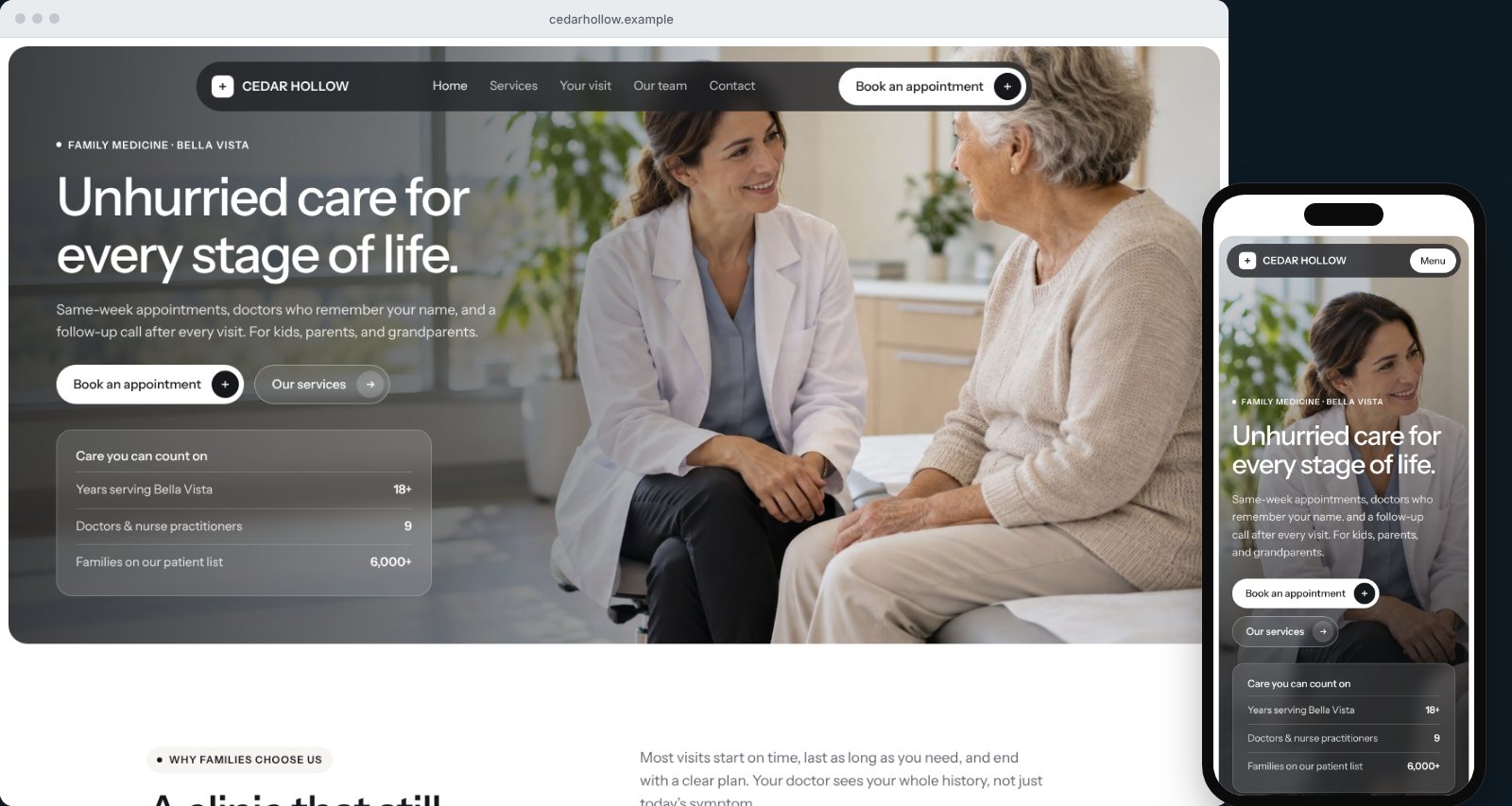
Our sample family medicine homepage puts all four above the fold, with a warm, real-world photo and a short "care you can count on" summary.
Service pages that put patients at ease
Patients search for conditions and treatments, not practice names: "knee pain physical therapy," "annual physical," "pediatric sick visit." Each core service deserves a page that explains:
- Who it's for and common reasons people come in.
- What happens at the first visit and what treatment typically looks like.
- Who will provide care, with credentials.
- Insurance, referrals, and any preparation needed.
- How to book.
See our sample physical therapy service page, which pairs what's treated with a clear plan and the therapist behind it.
Introduce your providers
Patients want to know who they'll see. Every provider should have a page or section with a professional photo, credentials, specialties, education, languages spoken, and a short personal note about their approach to care. This is where independent practices can stand out from large health systems: real people, not a directory listing.
Make booking simple, and keep it safe
If you offer online self-scheduling, put it front and center. If you don't, an appointment request form with a fast callback still meets much of the demand.
One important rule: general website forms shouldn't collect detailed health information unless they're built on a HIPAA-compliant system. Ask for name, contact details, preferred days and times, insurance provider, and a general reason for the visit, and include a note asking patients not to share medical history in the form. Our sample booking page shows how to do this without adding friction.
Answer the practical questions up front
Many calls to a front desk are questions a website could answer. Reduce them by publishing:
- Accepted insurance plans and self-pay options.
- Hours, holiday hours, and after-hours guidance.
- Parking, accessibility, and directions.
- New-patient forms and what to bring.
- A patient portal link for existing patients.
Local SEO for medical practices
- Complete your Google Business Profile, and set up separate profiles for individual providers where appropriate.
- Ask satisfied patients for reviews, without offering incentives, and respond professionally without confirming anyone is a patient.
- Keep your practice name, address, and phone consistent across Google, insurer directories, and health listing sites.
- Build pages around services and conditions patients actually search for.
Accessibility and speed aren't optional
Your patients include people with low vision, older adults, and anyone checking your site on a phone in a waiting room. Use readable type sizes, strong color contrast, descriptive image text, and clear buttons, and make sure pages load quickly on mobile. It's the right thing to do, and it's good for search too.
Common medical practice website mistakes
- Not saying whether you take new patients. It's one of the most common reasons people call. Answer it on the homepage.
- Outdated insurance lists. An old list causes frustrated calls and lost trust. Review it every time your contracts change.
- Provider pages without photos. Patients want to see who they'll meet. A friendly, professional photo makes a real difference.
- Forms that ask for health history. Unless they're built on a HIPAA-compliant system, keep clinical details off general web forms.
- PDFs for everything. New-patient packets as PDFs are hard to read and fill out on a phone. Offer mobile-friendly versions or portal forms where possible.
Content patients actually look for
Patients research symptoms and treatments before they book. A practice that explains common conditions, what treatment involves, and when to seek care builds trust before the first visit. A physical therapy clinic might explain what to expect in the first three visits for knee pain. A family practice might cover when a child's fever needs a same-day appointment.
Keep this content accurate, reviewed by a clinician, and written in plain language. Add a review date so patients know it's current, and always include a note that it isn't a substitute for personal medical advice. Then link each article to the relevant service page and your booking page, so a patient who recognizes their situation knows exactly what to do next.
How FreshSite builds healthcare websites
FreshSite builds custom websites for independent clinics, therapy practices, and specialty providers with service pages, provider bios, booking or appointment request flows, and search basics included, then hosts, secures, and maintains them for one monthly price. Plans start at $59 a month with a $299 setup fee.
See more on our healthcare websites page, or tell us about your practice.
Frequently asked questions
What should a medical practice website include?
Clear information on services, providers, locations, hours, accepted insurance, and how to book, plus provider bios with credentials, patient reviews where appropriate, a new-patient section, a patient portal link, and fast, accessible mobile performance.
Can a practice website collect patient information through a contact form?
A general appointment request form is common, but it should not collect detailed health information unless it is built on a HIPAA-compliant system. Ask for contact details, preferred times, and a general reason for the visit, and handle clinical details in a secure portal or by phone.
Do clinics need online scheduling?
It's increasingly expected. Surveys show a large and growing share of patients prefer to book online, especially younger adults. Even if you can't offer full self-scheduling, an appointment request form with a quick callback meets much of that need.
How do independent practices compete with large health systems online?
By being specific and personal: clear service pages, real provider photos and bios, strong local reviews, fast responses, and an easy booking path. Independent practices often win on access and personal care, so the website should make that obvious.